Goodreads: Book Tracker & More
GoodreadsBooks & Reference
4.612.60K Reviews
- Version
- 2.77.0 Build 3
- Installs
- 10.00M
- Age Rating
- Teen
Screenshots
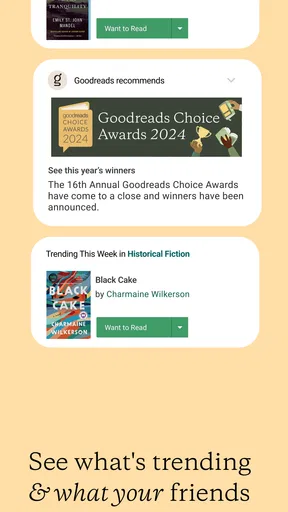
Our Review of Goodreads: Book Tracker & More
 Analysis by Appyee
I reached for Goodreads when I wanted one place to remember what I had read, decide what to pick up next, and see how other readers felt before committing to a book. It is a free Books & Reference app from Goodreads, and its main appeal is not that it replaces every reading tool. Instead, it connects the small decisions around reading: finding a title, saving it, recording progress, writing a reaction, and keeping a personal history.
That distinction matters. If you only want an uncluttered ebook reader, this is not the right category of app. If you enjoy building a reading list, comparing opinions, and making your reading life easier to organize, it becomes much more useful. I found it most valuable as a companion to physical books, ebooks, and audiobooks rather than as the place where I actually read them.
How I Decide Whether Goodreads Is Worth Using
My first test for a book-tracking app is simple: can I add a book quickly without turning the process into a chore? Goodreads does well here because its identity is built around a large book community and a searchable catalog. I can look up a title, check its reader response, and place it into a personal reading plan instead of leaving another half-remembered recommendation in a notes app.
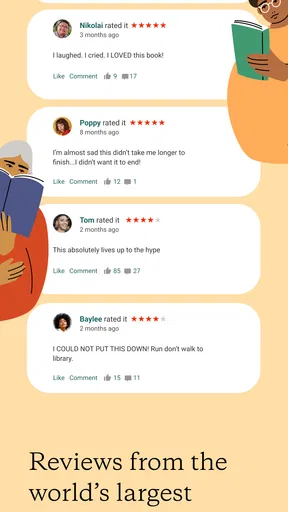
The second test is whether the app helps me make better choices, rather than merely storing a list. A star average can be a useful first signal, but I pay more attention to the written reviews, the reasons people enjoyed or disliked a book, and whether those reactions match my own tastes. The community aspect gives the app more context than a private spreadsheet, although it also means I need to filter opinions carefully.
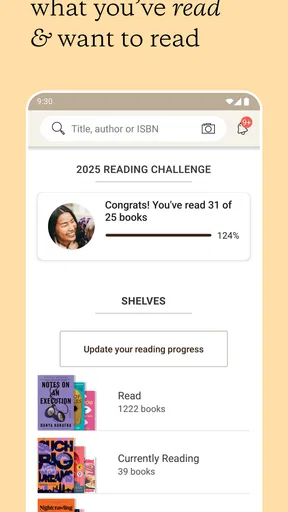
The third test is long-term usefulness. A tracker should still help after the initial excitement of adding books. Goodreads works best when I use it as a lightweight reading journal: I save titles I may want later, mark books I am currently reading, and leave a short note when I finish. That routine turns an otherwise forgettable reading habit into something I can look back on.
There is also a practical question: do I want discovery mixed with record keeping? Some readers prefer a clean list with no social layer. I prefer having the option to browse reactions, but I do not treat every recommendation as equally reliable. The app rewards active curation. If I save every interesting title I see, my list becomes noisy; if I use shelves and reviews deliberately, it becomes a useful personal map.
What the everyday workflow feels like
A realistic use case is a weekend visit to a bookshop. I might notice a novel whose cover looks familiar but cannot remember why. I can search for it, inspect the general reader response, and decide whether it belongs on my future list. Later, when I start the book, I can move it into my current reading group. Once I finish, recording a rating and a few sentences helps me remember what worked, especially when a friend asks for a recommendation months later.
That workflow is more valuable than it sounds. I often forget the details of books I enjoyed, even when I remember the overall feeling. A short personal review gives me a searchable memory of my own reading, while the public conversation helps me discover patterns in my taste. I also find it useful to write the review before reading other reactions, because that keeps my first impression from being shaped by the loudest opinion on the page.
For a more organized routine, I would create separate groups for books I want to read soon, books I am merely curious about, and books I have completed. The important tip is not to treat the reading list as a warehouse. A smaller, actively maintained list is easier to use when I need a recommendation quickly. I would also add a note explaining why I saved an unusual title; otherwise a vague recommendation can lose its meaning later.
Discovery is the strongest reason to stay
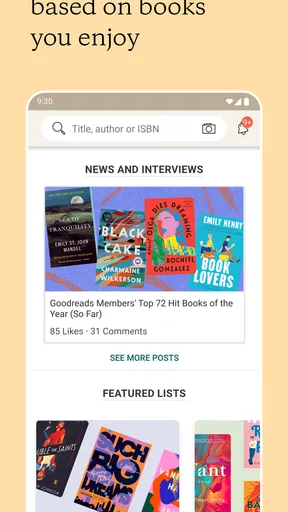
The app’s biggest strength is the connection between a book’s identity and the reactions surrounding it. Store descriptions can tell me what a publisher wants to emphasize, while reader reviews often reveal pacing issues, emotional tone, or the kind of patience a book requires. I still avoid spoilers, but even a few carefully chosen reactions can tell me whether a title suits my mood.
This is especially helpful when I am moving between genres. A friend may recommend a historical novel, a memoir, or a mystery that I would not normally search for. Instead of asking for a complete explanation, I can use the app to understand the general conversation around it and save it for later. The discovery process feels more personal than browsing a generic bestseller list because the useful clues often come from individual reading experiences.
Another less obvious benefit is comparison within an author’s work. When I am deciding which book to try first, I can look at several titles together and read reactions from people who have already made that journey. This does not guarantee that I will choose the best starting point, but it reduces the guesswork. I can also keep track of books I abandoned, which prevents me from accidentally returning to a title I already know was a poor fit.
Where Goodreads wins over simpler trackers
Compared with a notes app, Goodreads gives my reading record a structure that I would otherwise have to build myself. A note can store titles, but it does not naturally connect my list to a wider pool of reader discussion. A spreadsheet offers control and sorting, yet it requires manual upkeep and does little to help me discover what to read next.
Compared with an ebook reader, Goodreads serves a different purpose. A dedicated reading app is usually the better choice for page display, typography, highlighting, and reading comfort. Goodreads is better before and after the reading session: choosing the book, keeping a record, and sharing a reaction. I would not install it expecting a replacement for the app that opens my ebooks.
Compared with a private journal, Goodreads adds a social dimension. That can be motivating when I enjoy seeing other people’s opinions or sharing my own. It can also make reading feel performative if I start choosing books because they look impressive on a profile. My practical advice is to use the social features as optional context, not as a scorecard for how productive I have been.
The app has a strong public presence as well. It has a 4.6 average from around 213 thousand ratings and more than 10 million installs, which suggests that its basic model has broad appeal. I see those figures as evidence of reach rather than proof that every reader will enjoy the experience. A large community improves discovery, but it also brings uneven review quality and more opinions to sort through.
Small habits that make the app more useful
One habit I recommend is separating “I might read this” from “I genuinely plan to read this soon.” Without that distinction, recommendations accumulate faster than I can process them. When I am ready to choose another book, I check the shorter, more intentional group first and leave the wider collection for relaxed browsing.
A second habit is writing a review that records my own context, not just a verdict. I might mention that I read a book during a busy week, found the opening slow, or enjoyed the characters more than the plot. Those details make the entry useful to my future self. They also make public reviews more helpful than a single star rating, because another reader can decide whether my experience resembles theirs.
A third habit is using reviews diagnostically. If several readers mention the same weakness, I do not automatically reject the book. I ask whether that weakness matters to me. A slow beginning may be a problem when I want a fast thriller, but completely acceptable when I am in the mood for atmosphere. This approach keeps the app from making decisions for me.
I also avoid treating the community average as a universal ranking. Books appeal to different audiences, and a review from someone with completely different preferences may be accurate but irrelevant to my choice. The most useful reviews explain their expectations. When I find readers whose taste overlaps with mine, their future recommendations become more valuable than a general score.
Where another kind of app may fit better
Goodreads is not the best choice for someone who wants a distraction-free reading environment. If your priority is opening an ebook and reading with minimal social or catalog activity, a dedicated ebook reader will likely feel more direct. Goodreads adds planning and community around the book, but that extra layer is unnecessary if all you want is a comfortable page.
It may also disappoint readers who want highly detailed personal statistics or a completely customizable database. The app is designed for accessible tracking and sharing, not for turning every aspect of reading into a carefully engineered dashboard. A spreadsheet or specialized private tracker may suit someone who wants extensive fields, custom formulas, or precise control over how information is organized.
Readers who dislike public discussion should think about the social emphasis before installing it. You can use the app privately enough for basic tracking, but its identity is closely tied to reviews, recommendations, and reader activity. If you find ratings distracting or feel pressure from other people’s reading habits, a private notes system may be calmer and more satisfying.
There is also a quality-control trade-off. Community reviews can be insightful, but they can be brief, emotional, repetitive, or spoiler-heavy. I would not use one reaction as the deciding factor for an expensive purchase or a book chosen for a study project. For serious academic research, a library catalog, publisher information, or specialist source is more appropriate. Goodreads is strongest for personal reading decisions, not for replacing authoritative reference material.
The cost of changing your reading system
Because the app is free, the main cost is not money. It is the time needed to build a useful record and maintain it. Adding a large backlog can feel productive while creating a list that is difficult to navigate. I would start with books I have recently finished, books I am currently reading, and a modest selection of future titles. That gives the profile immediate value without requiring a full history project.
Switching from a private list also involves a change in mindset. A personal note is flexible and invisible; Goodreads encourages a more structured record and makes sharing part of the experience. Before moving everything over, I would decide which information actually matters. Titles and reading status are easy to transfer conceptually, while old comments may not be worth recreating word for word.
Switching away later is similarly manageable if I keep my own important notes elsewhere. My advice is to treat Goodreads as the convenient public-facing layer, not the only place where meaningful memories exist. For short opinions, the app is enough. For detailed reading journals, I would keep a separate archive and use Goodreads for discovery and quick tracking.
The app also requires occasional maintenance. A reading list can become cluttered, and a forgotten status can make the record inaccurate. I find a short cleanup every few weeks more effective than trying to organize everything perfectly at the beginning. Removing titles that no longer interest me is not a failure; it makes the remaining recommendations more honest.
Version, access, and who should use it
The current release is version 2.76.0 Build 0, and the app requires operating system version 10 or later. It is rated Teen, so families should consider whether the community content and book discussions are appropriate for the younger person using it. The developer is Goodreads, and the app has been available since April 29, 2011, giving it a long-running place in the reading-app landscape.
For me, the strongest candidates are readers who regularly forget recommendations, enjoy comparing opinions, or want a simple record of finished books. It is also useful for book-club participants who need a quick way to look up titles and gather impressions before a discussion. Someone who reads only occasionally can still benefit, but the app becomes more worthwhile when reading is an ongoing habit.
I would skip it if I want only a private checklist, a polished ebook reader, or an advanced research database. Those needs point toward different tools, and forcing Goodreads into one of those roles would create unnecessary friction. Its value comes from combining a personal reading log with a broad reader community, not from doing every book-related task.
My recommendation after using it as a reading companion
I recommend Goodreads to anyone who wants help deciding what to read and remembering what they have read. The free price makes experimenting easy, and the large community gives the discovery side genuine depth. I especially like it for the moment between finishing one book and choosing the next, when a personal history and several reader perspectives can prevent an uninspired choice.
I would approach it with two boundaries: do not confuse the community average with your own taste, and do not let the reading list become an obligation. Used that way, the app stays practical rather than competitive. I would also keep a separate private journal for longer reflections, school research, or memories I do not want to share.
My final judgment is that Goodreads is best understood as a decision and tracking companion, not a complete reading ecosystem. It wins over basic notes through discovery and community, while dedicated reading tools remain better for the actual reading session. If you want one place to organize your reading life without paying for the organizing layer, this is a worthwhile choice. If your priorities are privacy, deep customization, or distraction-free pages, another category of app will fit more naturally.
Privacy and Permissions
See what permissions an app requests and how it handles your data.
- Contacts
- read your contacts
- Photos/Media/Files
- read the contents of your USB storage
- Storage
- read the contents of your USB storage
- Camera
- take pictures and videos
- Wi-Fi connection information
- view Wi-Fi connections
- Other
- view network connections, connect and disconnect from Wi-Fi, full network access, prevent device from sleeping
Verdict
Strengths of Goodreads: Book Tracker & More
- Tracks reading progress, ratings, reviews, and personal reading goals.
- Large community makes it easy to discover books through reader opinions.
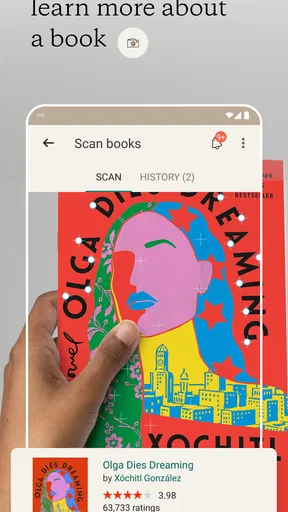
- Barcode scanning quickly adds physical books to your personal shelves.
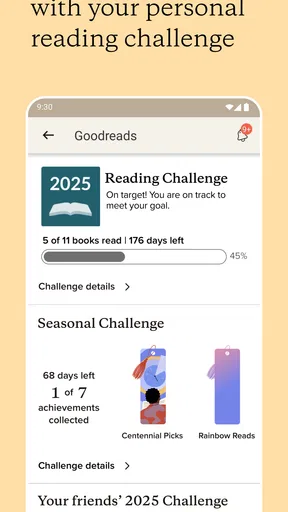
- Yearly reading challenges help maintain motivation and reading consistency.
- Available across devices, keeping shelves and progress synchronized.
Limitations of Goodreads: Book Tracker & More
- Some book editions and cover details may be duplicated or inaccurate.
- Recommendations can feel repetitive if your reading history is limited.
- The interface may feel busy because of frequent community updates.
- Social features and notifications can distract from simple book tracking.
- Many useful titles lack reliable summaries, previews, or complete metadata.
Similar Picks in This Category
View All
Google Play Books & Audiobooks
Google LLC4.7

네이버 - NAVER
NAVER Corp.3.5

Wattpad - Read & Write Stories
Wattpad.com3.7

King James Bible - Verse+Audio
Ozion4.8

Bible Offline-KJV Holy Bible
Bíblia Offline4.9

Amazon Kindle: Reading App
Amazon Mobile LLC4.8
Frequently Asked Questions
What is Goodreads: Book Tracker & More used for?
Goodreads is a social reading app that helps you discover books, organize your reading life, and keep track of titles you want to read, are currently reading, or have finished. You can search a large catalog, read community reviews, rate books, write your own opinions, and follow friends or authors. It is particularly useful if you enjoy setting reading goals and maintaining a personal digital bookshelf.
Can I use Goodreads to track my reading progress and set goals?
Yes. Goodreads allows you to add books to shelves such as Want to Read, Currently Reading, and Read, then update your progress by entering the page number or percentage completed. You can also create a yearly reading challenge and monitor your progress throughout the year. These tools are helpful for building a consistent reading habit, although progress updates may require occasional manual input.
Does Goodreads provide reliable book recommendations?
Goodreads offers recommendations based on your ratings, shelves, favorite genres, and reading activity. You can also explore lists created by the community, see what friends are reading, and browse popular or recently reviewed titles. The suggestions can be useful for finding new books, but they are influenced by user-generated data, so some recommendations may feel repetitive or vary in quality.
Can I read complete books inside the Goodreads app?
Goodreads is mainly a discovery, tracking, and review platform rather than a full e-book reader. While some books may include previews, excerpts, or links to retailers and libraries, the app generally does not provide unlimited access to complete books. If you want to read a title digitally, you will usually need a separate reading service, an e-book store, or access through your local library.
Is Goodreads free, and do I need an account to use it?
Goodreads is free to download and provides its main tracking, discovery, rating, and community features without requiring a subscription. An account is needed to save books, create shelves, post reviews, follow users, and synchronize activity across devices. The app may contain promotional content or links to external retailers, and some features can work differently depending on your region and device.
